Ticket Agent

The answer is already in previous tickets

What a colleague solved last month sits in a closed ticket. For a new ticket, the Ticket Agent searches for useful information and prepares a proposal with sources in your own helpdesk. The specialist decides what happens with it.

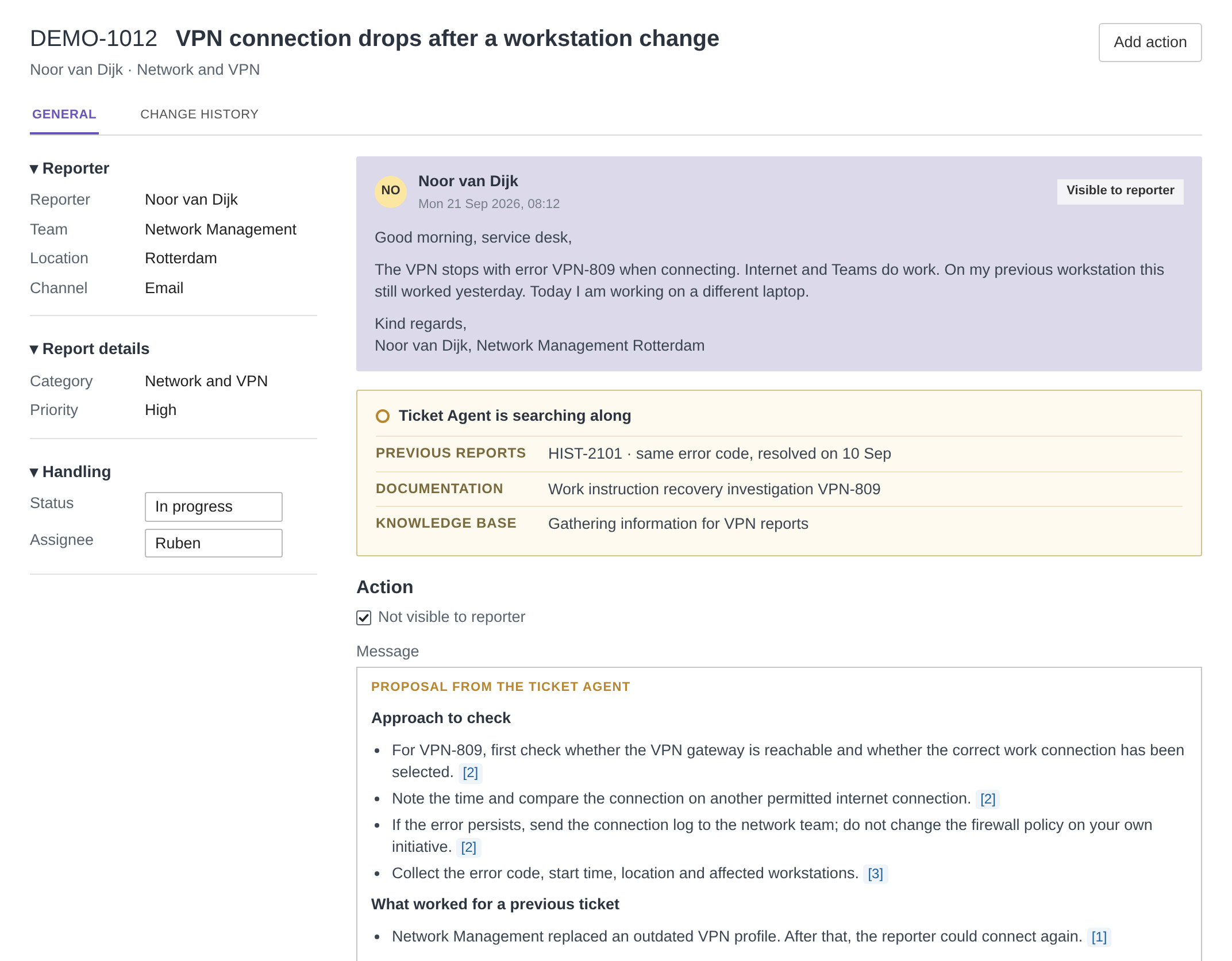
A proposal from the Ticket Agent as an internal note in a ticket, with the sources below it

How it works now

The knowledge is there. But who knows where?

A specialist who picks up a ticket starts by searching: in previous reports, in the documentation, in the knowledge base. Often a colleague has already solved exactly this problem. That answer sits in a closed ticket, but it is hard to find again.

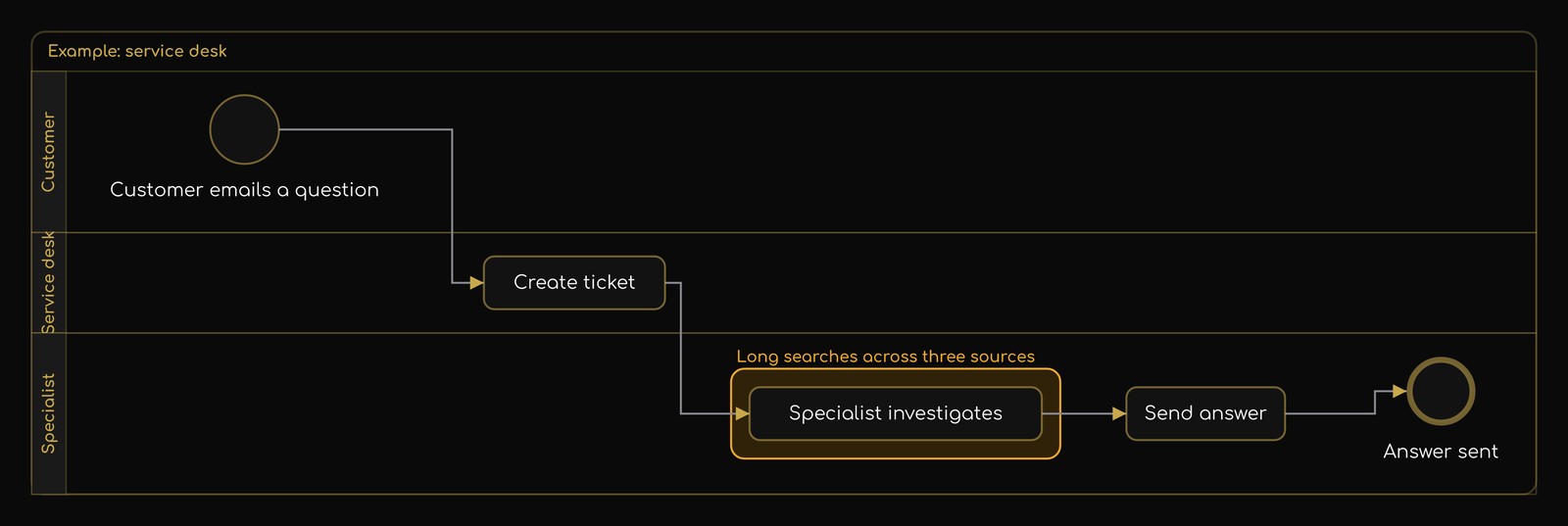
BMS map of a service desk: how it works now, with the specialist's searching as the bottleneck
How it works now: the specialist's searching is marked as the bottleneck. The map was made in BMS (Business Model Software), view it step by step.

With the Ticket Agent

It searches, the specialist decides

For a new ticket, the Ticket Agent searches the same sources as the specialist. It puts a proposal in the ticket as an internal note, with the sources included. The customer does not see it.

The specialist reads the proposal, checks what is needed and writes the answer themselves. They start from the proposal instead of from searching. If the Ticket Agent finds nothing useful, the note says so, along with the information that is still needed.

Previous tickets

Closed reports with their solution: what worked, who did it and when.

Documentation

Work instructions and manuals, with the version that applied.

Knowledge base

Articles the team maintains itself.

Flowchart of the same service desk with the Ticket Agent: for a new ticket, the Ticket Agent searches the sources and prepares a proposal; the specialist reviews the ticket and the proposal
How it will work: the Ticket Agent prepares the searching, the specialist reviews the ticket and the proposal and answers.

Demo with a fictional ticket

One ticket, from arrival to answer

    ☰
    ⌂
    All reports
    DEMO-1012 VPN connection drops
    ⚲RU
    ▤⚲

    DEMO-1012 VPN connection drops after a workstation change

    Noor van Dijk · Network and VPN

    Add action
    GENERALCHANGE HISTORY

    ▾ Reporter

    Reporter
    Noor van Dijk
    Team
    Network Management
    Location
    Rotterdam
    Channel
    Email

    ▾ Report details

    Category
    Network and VPN
    Priority
    High

    ▾ Handling

    Status
    New
    Assignee
    Ruben
    NO
    Noor van DijkMon 21 Sep 2026, 08:12
    Visible to reporter

    Good morning, service desk,

    The VPN stops with error VPN-809 when connecting. Internet and Teams do work. On my previous workstation this still worked yesterday. Today I am working on a different laptop.

    Kind regards,
    Noor van Dijk, Network Management Rotterdam

    Action

    Not visible to reporter

    Message

    Proposal from the Ticket Agent

    Approach to check

    • For VPN-809, first check whether the VPN gateway is reachable and whether the correct work connection has been selected. ✓ Ruben
    • Note the time and compare the connection on another permitted internet connection.
    • If the error persists, send the connection log to the network team; do not change the firewall policy on your own initiative.
    • Collect the error code, start time, location and affected workstations.

    What worked for a previous ticket

    • Network Management replaced an outdated VPN profile. After that, the reporter could connect again. ✓ Ruben: correct, laptop has the old profile

    A previous solution is a lead, not an established diagnosis. Check whether it applies here too.

    Sources

    HIST-2101 · VPN: closed report VPN-809
    Work instruction: recovery investigation VPN-809 · version 2026.09.1
    Knowledge base: gathering information · version 2026.09.1

    Save
    RU
    RubenMon 21 Sep 2026, 08:31
    Visible to reporter

    Hi Noor, your new laptop is still using an old VPN profile. Network Management will set up a new profile for you this morning. Then try connecting again and let me know if it works.

    Regards, Ruben

    How we start

    The helpdesk stays, the team works the way it is used to

    There is no need to switch to another system. The Ticket Agent works alongside the current helpdesk. On request, we connect it to the ticket system already in use; what that requires, we discuss in the first conversation.

    Introduction

    The team shows how the service desk works and where colleagues search today. We map that.

    Trial on your own tickets

    We test the Ticket Agent on previously closed tickets and compare its proposals with what the team did at the time. That shows what it is worth before it goes live.

    In your own helpdesk

    The proposals appear as an internal note on new tickets. The specialists decide, and we keep an eye on what works and what could be better.

    Questions

    Frequently asked questions

    Where does our data stay?

    Within the EU. The Ticket Agent runs on Microsoft Azure in European data centres. The tickets are not used to train AI models.

    And if it finds nothing?

    Then it says so in the note and names the information that is still needed. The specialist can then ask targeted follow-up questions.

    Does it work with our ticket system?

    We build the connection on request, for the ticket system already in use. In the first conversation, we look at what that requires.

    What if it gets it wrong?

    The specialist assesses the proposal and checks the sources. If it is not right, the specialist does not use the proposal and writes the answer themselves, as they do now. Nothing goes to the customer unless the specialist has read it and sent it personally.

    Does it answer customers itself?

    No. It only prepares; the answer always comes from your own specialist.

    How quickly can we start?

    Setting it up takes us about seven working days. After that, the trial on your own tickets runs first; after the first conversation, the timing of each step is fixed.

    Contact

    Would you like to know how your service desk can handle tickets more efficiently?

    In a first conversation, we look together at how the Ticket Agent improves the quality and speed of ticket handling in your situation.

    How many tickets come in per month? (optional)

    How many people work on the service desk? (optional)

    How much time does a ticket take on average? (optional)

    Which ticket system do you use? (optional)